User Guide
NUSocials is a desktop app for university students to maintain a professional contact list, where users can keep track of information about friends/acquaintances easily in one single platform. It is optimized for use via a Command Line Interface (CLI) while still having the benefits of a Graphical User Interface (GUI). The value of the app is to facilitate a convenient way for university students to manage their professional networks with fellow acquaintances.
- Quick start
- Features
- FAQ
- Command summary
Quick start
-
Ensure you have Java
11or above installed in your Computer. -
Download the latest
NUSocials.jarfrom here. -
Copy the file to the folder you want to use as the home folder for NUSocials.
- To start the app:
- Windows: Double-click on
NUSocials.jar. - MacOS: On terminal, navigate to the directory containing
NUSocials.jarand runjava -jar NUSocials.jar.
- Windows: Double-click on
-
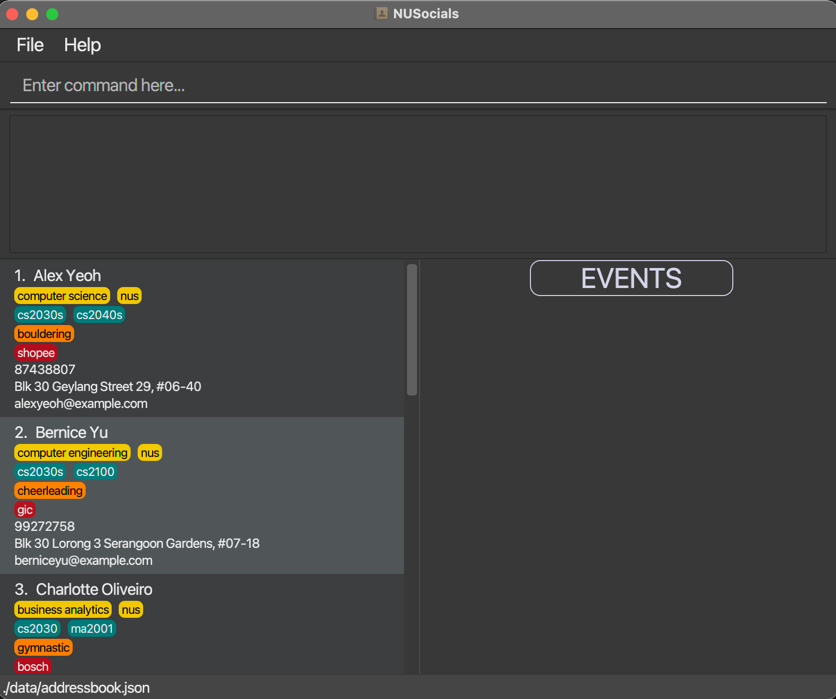
The GUI similar to the below should appear in a few seconds. Note how the app contains some sample data.
-
Type the command in the command box and press Enter to execute it. e.g. typing
helpand pressing Enter will open the help window.
Some example commands you can try:-
list
Lists all contacts. -
addn/fred p/99998888 e/fred@example.com a/fred street, block 123, #01-01
Adds a contact namedfredto NUSocials. -
tag2 edu/computer science m/CS2040S
Tags the 2nd contact shown in the current list with a Computer Science degree and CS2040S module. -
event1 name/Lunch appointment info/at Hai Di Lao d/2023-05-15 t/13:00
Creates an event namedLunch appointmentand associate it with the 1st contact. -
findn/fred
Find any person whose name contains ‘fred’.
-
- Refer to the Features below for details of each command.
Features
 Notes about the command format:
-
Words in
UPPER_CASEare mandatory parameters to be supplied by the user.
e.g. inadd n/NAME,NAMEis a parameter which can be used asadd n/Kim Lai. -
Items in square brackets are optional.
e.gn/NAME [edu/EDUCATION]can be used asn/Kim Lai edu/computer scienceor asn/Kim Lai. -
Items with
… after them can be used zero or more times.
e.g.[m/MODULE]…can be used asm/CS2040S,m/CS2030S m/CS2100etc. -
Extraneous parameters for commands that do not take in parameters (such as
list,clear,helpandexit) will be ignored.
e.g. if the command specified islist 123, it will be interpreted aslist. -
If a parameter is expected only once in the command but you specified it multiple times, they will all be rejected.
e.g. if you specifyp/12345678 p/87654321, both will be rejected. -
Parameters can be in any order.
e.g. if the command specifiesn/NAME p/PHONE_NUMBER,p/PHONE_NUMBER n/NAMEis also acceptable. -
If an
INDEXis used, it must be a positive integer (i.e. 1, 2, 3…). -
All commands are case-sensitive.
Viewing help : help
Shows a message explaining how to access the help page.

Format: help
Person Commands:
Listing all persons: list
Shows a list of all persons in NUSocials.
Format: list
- All existing persons and upcoming events are automatically rendered when the application is launched.
- The different tags are listed as follows:
- Yellow for education
- Teal for modules
- Orange for CCAs
- Red for internships
- Personal details are listed in the following order:
- Phone number
- Address

Adding a person: add
Adds a person to NUSocials and lists all upcoming events.
Format: add n/NAME p/PHONE_NUMBER e/EMAIL a/ADDRESS
Constraints:
- Only 1 prefix for each field is allowed.
-
NAMEhas to be alphanumeric not blank. -
PHONE_NUMBERhas to be between 3 and 10 digits long and not blank. -
EMAILhas to be in a valid email format and not blank.- The local part of the
EMAILshould be alphnumeric and these special characters, excluding the parentheses, (+-._) - The local part should not start and end with any of the mentioned special characters
- ”@” comes right after the local part, followed by a domain name
- The domain name must:
- end with a domain label at least 2 characters long\n”
- have each domain label start and end with alphanumeric characters\n”
- have each domain label consist of alphanumeric characters, separated only by hyphens, if any.”
- The local part of the
-
ADDRESShas to not be blank. - All fields must be used.
Example:
-
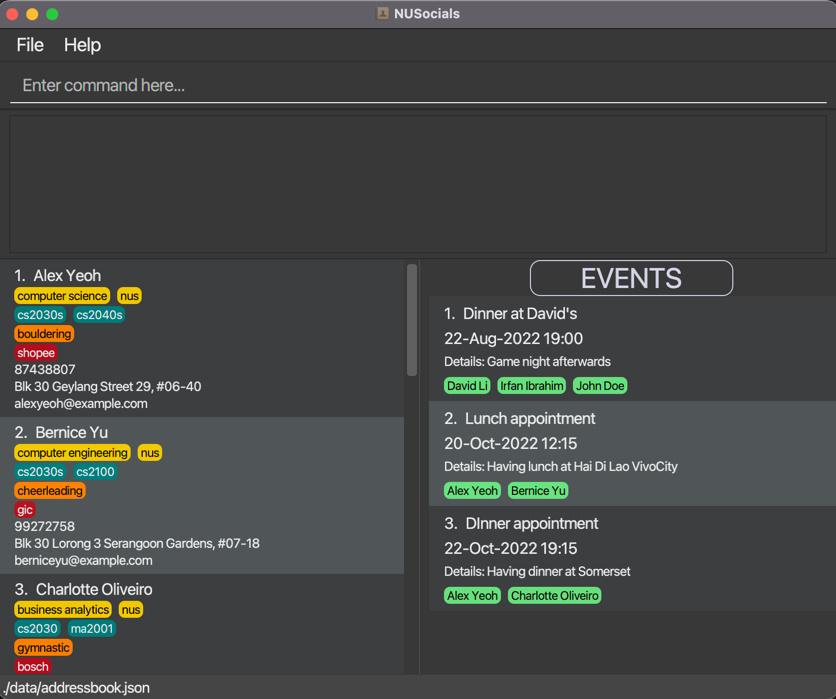
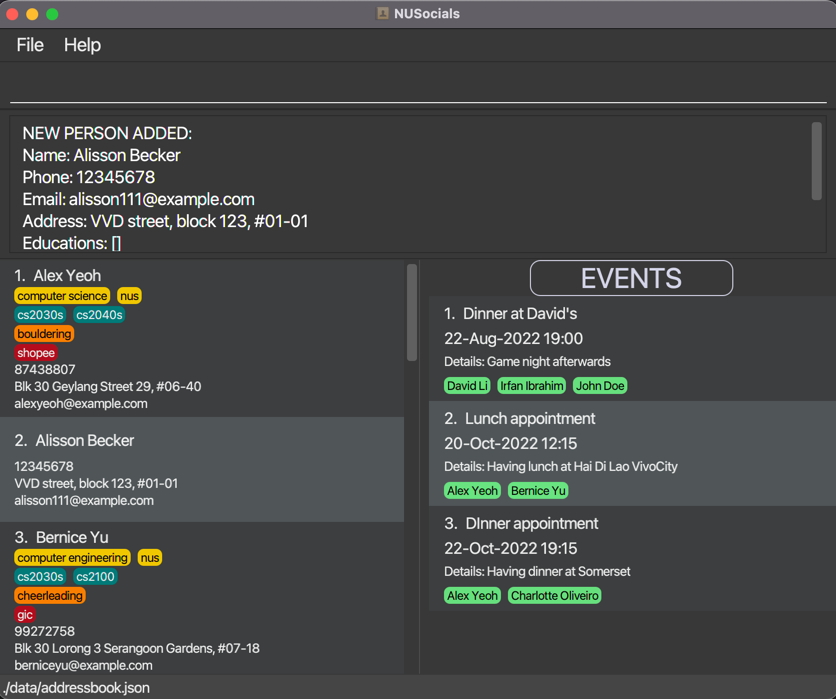
add n/Alisson Becker p/12345678 e/alisson111@example.com a/VVD street, block 123, #01-01Adds a person with the following fields:- Name: Alisson Becker
- Phone Number: 12345678
- Email: alisson111@example.com
- Address: VVD street, block 123, #01-01
| Before | After |
|---|---|
 |
 |
 Invalid Examples:
-
add n/Kim Lai n/Fred Tang p/12345678 e/kimlai222@example.com a/KL street, block 190, #01-23
Not allowed as n/ prefix is used more than once.
-
add n/Kim Lai p/ e/kimlai222@example.com a/KL street, block 190, #01-23
Not allowed as PHONE_NUMBER is blank.
Deleting a person : delete
Deletes the specified person from NUSocials.
Format: delete INDEX
- Deletes the person at the specified
INDEX. - The index refers to the index number shown in the displayed person list.
Constraints:
-
INDEXprovided has to be on the currently shown contact list.
Examples:
-
listfollowed bydelete 2deletes the 2nd person in the currently shown contact list. -
find n/Betsyfollowed bydelete 1deletes the 1st person from the resulting list of thefindcommand.
Deleting multiple persons : delete
Deletes all the specified persons from NUSocials.
Format: delete INDEX…
- Deletes multiple persons at the specified
INDEXnumbers. - The index refers to the index number shown in the displayed person list.
- Each index must be separated by a whitespace and must be unique.
Constraints:
- All
INDEXnumbers provided has to be on the currently shown contact list.
Example:
-
listfollowed bydelete 2 5 7deletes the 2nd, 5th and 7th person in the currently shown list.
Editing a person : edit
Edits an existing person’s details in NUSocials.
Format: edit INDEX [n/NAME] [p/PHONE] [e/EMAIL] [a/ADDRESS]
- Edits the person at the specified
INDEX. - The index refers to the index number shown in the displayed person list.
- At least one of the optional fields must be provided.
Constraints:
- Only 1 prefix for each field allowed.
-
NAMEhas to be alphanumeric not blank. -
PHONE_NUMBERhas to be between 3 and 10 digits long and not blank. -
EMAILhas to be in a valid email format and not blank. -
ADDRESShas to not be blank. -
INDEXprovided has to be on the currently shown contact list.
Example:
-
edit 1 p/91234567 e/KL123@example.com
Edits the phone number and email address of the 1st person to91234567andKL123@example.comrespectively.
 Caution:
Existing values will be overwritten and updated to the new input values!
Caution:
Existing values will be overwritten and updated to the new input values!
Tagging a person: tag
Tags additional information to an existing contact.
Format: tag INDEX [i/INTERNSHIP]… [m/MODULE]… [c/CCA]… [edu/EDUCATION]…
- Tags the relevant information to the person at the specified
INDEX. - The index refers to the index number shown in the displayed person list.
- Alphabets in the input tag values will be converted to lowercase.
- Input tag values will be added to the existing tags in their respective fields.
- If the new input tag values are the same as existing tags, then nothing will be added.
Constraints:
- At least one of the prefixes must be provided.
- If a prefix is used, the input after must not be blank and must be alphanumeric.
-
INDEXprovided has to be on the currently shown contact list.
Example:
-
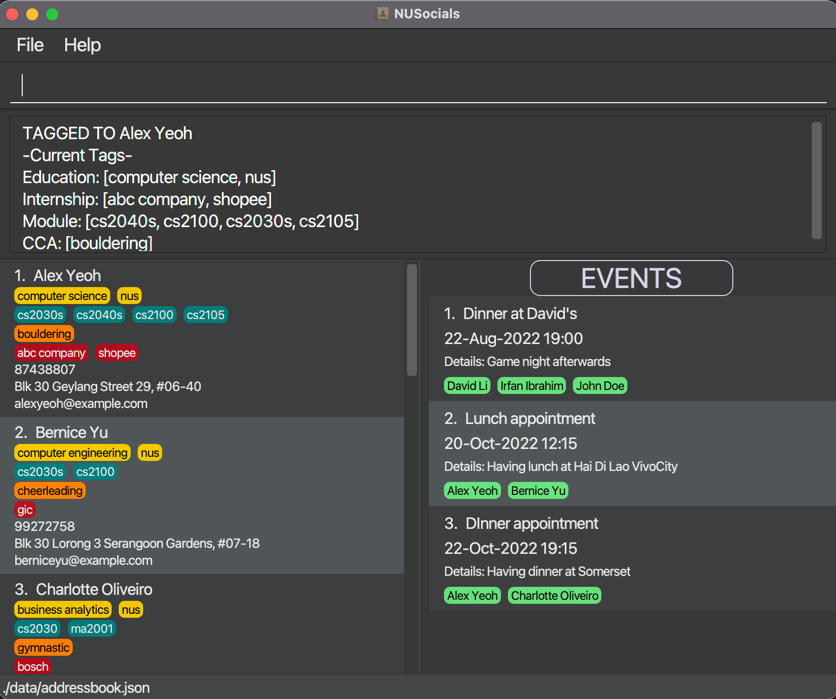
tag 1 i/abc company m/CS2100 m/CS2105(as shown below)
Tags the internship company and 2 modules to the 1st person in the currently shown contact list.
| Before | After |
|---|---|
|
 |
Invalid Examples:
-
tag 1
Not allowed as no prefix provided.
-
tag 1 i/ m/
Not allowed as there is no input given after a prefix is used.
-
tag 0 i/xyz company m/CS2103T
Not allowed as there INDEX 0 does not exist in the contact list.
Removing specific tags from person: removetag
Removes the specific tags of an existing contact.
Format: removetag INDEX [i/INTERNSHIP]… [m/MODULE]… [c/CCA]… [edu/EDUCATION]…
- Removes the tags from the person at the specified
INDEX. - The index refers to the index number shown in the displayed person list.
Constraints:
- At least one of the prefixes must be provided.
- If a prefix is used, the input after must not be blank.
- All inputs for tags provided must be an exact match to existing tags.
-
INDEXprovided has to be on the currently shown contact list.
Example:
-
removetag 1 i/abc company m/CS2100 m/CS2030S
Removes the internship company tag and the 2 modules tags from the 1st person in the currently shown contact list.
Invalid Examples:
-
removetag 1 i/ m/
Not allowed as there is no input given after a prefix is used.
-
removetag 1 edu/computerwhile person 1 has an education tag withcomputer science
Not allowed as it is not an exact match.
Finding persons: find
Finds persons that match any of the given fields and tags.
Format: find [n/NAME] [p/PHONE_NUMBER] [e/EMAIL] [a/ADDRESS] [i/INTERNSHIP]… [m/MODULE]… [c/CCA]… [edu/EDUCATION]…
- The search is case-insensitive. e.g
hanswill matchHans - The matching is done by character sequence. e.g.
haornswill matchHans - Persons matching at least one of the fields or tags will be returned.
Constraints:
- At least one of the optional fields must be provided.
- Only 1 prefix for each basic particulars field is allowed.
Examples:
-
find m/cs2030s m/cs2040s
Returns anyone tagged with eithercs2030sorcs2040sor both -
find n/Hans m/cs2100
ReturnsHansandBo Yang(i.e. Bo Yang is tagged with cs2100) -
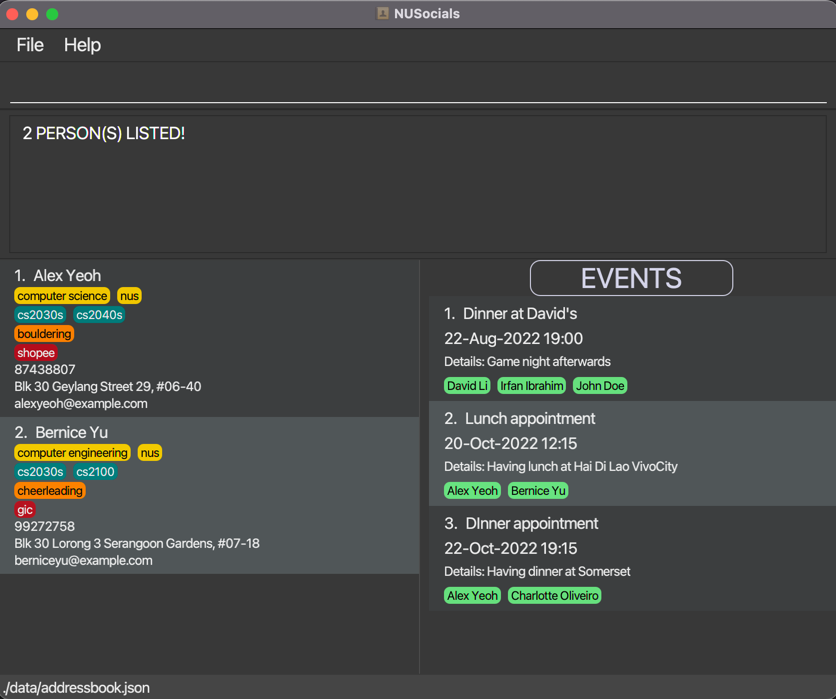
find i/Shopee m/cs2040s m/cs2030s
ReturnsAlex YeohandBernice Yu(as shown below)
| Before | After |
|---|---|
|
 |
Invalid Examples:
-
find n/ m/
Not allowed as there is no input given after a prefix is used.
-
find n/Hans n/Chewbacca
Not allowed as the n/ prefix is used more than once.
Finding specific persons: find -s
Finds persons that match all given fields and tags.
Format: find -s [n/NAME] [p/PHONE_NUMBER] [e/EMAIL] [a/ADDRESS] [i/INTERNSHIP]… [m/MODULE]… [c/CCA]… [edu/EDUCATION]…
- The search is case-insensitive. e.g
hanswill matchHans - The matching is done by character sequence. e.g.
haornswill matchHans - Only persons matching all fields and tags will be returned.
Constraints:
- At least one of the optional fields must be provided.
- Only 1 prefix for each basic particulars field is allowed.
Examples:
-
find -s n/Bo Yang m/cs2040s
ReturnsBo Yang(i.e. Bo Yang is tagged with cs2040s) -
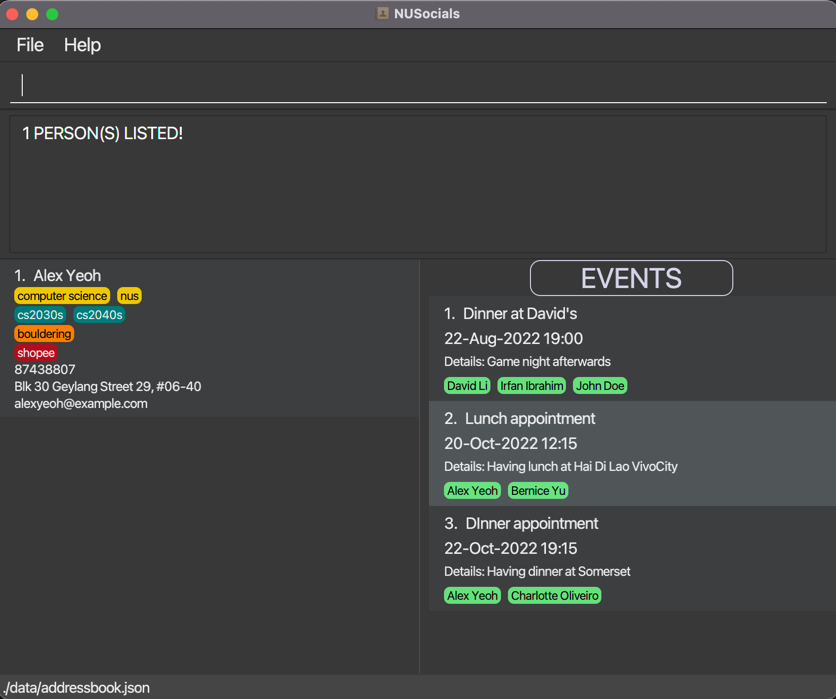
find -s i/Shopee m/cs2040s m/cs2030s
ReturnsAlex Yeoh(as shown below)
| Before | After |
|---|---|
|
 |
Invalid Examples:
-
find -s n/ m/
Not allowed as there is no input given after a prefix is used.
-
find -s n/Hans n/Solo
Not allowed as the n/ prefix is used more than once.
Event Commands:
Showing events: showevents
Shows a list of all events in NUSocials.
Format: showevents
- Events shown are automatically sorted in chronological order.
Tip :
Use the -upcoming or -past flags to filter the event list.
Alternate formats:
-
showevents -upcoming- Shows a list of all upcoming events instead
-
showevents -past- Shows a list of all past events instead
Adding an event: event
Adds an event into NUSocials.
Format: event INDEX… name/EVENT NAME info/EVENT DETAILS d/DATE t/TIME
- Tags the participating persons to the events based on the specified
INDEX…. - The index refers to the index number shown in the displayed person list.
- Each index must be separated by a whitespace and must be unique.
Constraints:
- All fields must be provided.
- Only 1 prefix for each field is allowed.
-
DATEhas to be in the format ofyyyy-MM-dd. -
TIMEhas to be in the format ofHH:mm. -
DATEandTIMEhas to be valid (i.e Date and Time specified must be after the current date and time) -
EVENT NAMEhas a limit of 100 characters. -
EVENT DETAILShas a limit of 300 characters.
Example:
-
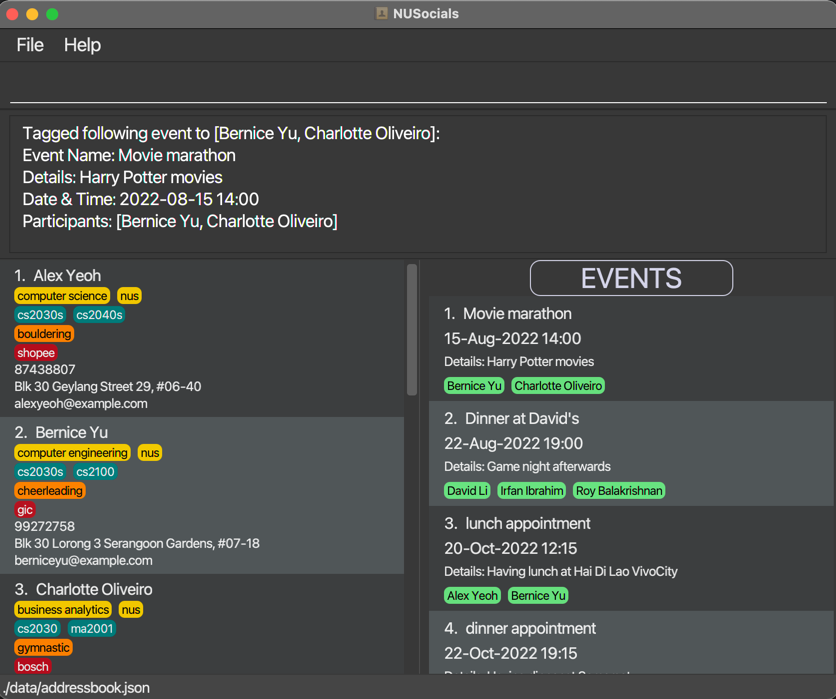
event 2 3 name/Movie marathon info/Harry Potter movies d/2022-08-15 t/14:00
Creates the Event and adds into NUSocials. (as shown below)
| Before | After |
|---|---|
|
 |
Invalid Examples:
-
event 1 2 name/ info/At Michael's d/2022-08-22 t/19:00
Not allowed as there is no input after a prefix is used.
-
event 1 2 name/Dinner appointment name/Game night info/At Michael's d/2022-08-22 t/19:00
Not allowed as the name/ prefix is more than once.
Cancelling an event : cancelevent
Deletes the specified event from NUSocials.
Format: cancelevent INDEX
- Deletes the event at the specified
INDEX. - The index refers to the index number shown in the displayed event list.
Constraints:
-
INDEXnumber provided has to be on the currently shown contact list.
Examples:
-
cancelevent 2deletes the 2nd event in the currently shown event list.
Cancelling multiple events: cancelevent
Deletes all the specified events from NUSocials.
Format: cancelevent INDEX…
- Deletes multiple events at the specified
INDEXnumbers. - The index refers to the index number shown in the displayed event list.
- Each index must be separated by a whitespace and must be unique.
Constraints:
- All
INDEXnumbers provided has to be on the currently shown contact list.
Examples:
-
cancelevent 2 5 7deletes the 2nd, 5th and 7th events in the currently shown event list.
Finding an event: find -e
Finds an event that matches any of the given details
Format: find -e [name/EVENT NAME]… [info/INFORMATION]… [part/PARTICPANT]… [dt/DATE AND TIME]…
- The search is case-insensitive. e.g
lunchwill matchLunch - The matching is done by character sequence. e.g.
lunwill matchlunch - Events matching at least one of the fields will be returned.
Constraints:
- At least one of the optional fields must be provided.
- Only 1 prefix for each basic particulars field is allowed.
-
DATEhas to be in the format ofyyyy-MM-dd. -
TIMEhas to be in the format ofHH:mm. -
DATEandTIMEhas to be valid (i.e Date and Time specified must be after the current date and time)
Example:
-
find -e name/lunch part/Alex Yeohreturns all events containinglunchin its name and all events involving Alex Yeoh
Invalid Examples:
-
find -e name/ info/
Not allowed as there is no input given after a prefix is used.
-
find -e name/Dinner name/Lunch
Not allowed as the name/ prefix is used more than once.
Clearing all entries : clear
Clears all entries from NUSocials.
Format: clear
Exiting the program : exit
Exits the program.
Format: exit
Saving the data
NUSocials data are saved in the hard disk automatically after any command that changes the data. There is no need to save manually.
Editing the data file
NUSocials data are saved as a JSON file [JAR file location]/data/addressbook.json. Advanced users are welcome to update data directly by editing that data file.
Caution:
If your changes to the data file makes its format invalid, NUSocials will discard all data and start with an empty data file at the next run.
FAQ
Q: How do I transfer my data to another Computer?
A: Install the app in the other computer and overwrite the empty data file it creates with the file that contains the data of your previous NUSocials home folder.
Command summary
| Action | Format, Examples |
|---|---|
| Add |
add n/NAME p/PHONE_NUMBER e/EMAIL a/ADDRESS e.g. add n/James Ho p/22224444 e/jamesho@example.com a/123, Clementi Rd, 1234665
|
| Tag |
tag INDEX [i/INTERNSHIP]… [m/MODULE]… [c/CCA]… [edu/EDUCATION]…e.g. tag 1 m/CS2105 m/CS2106
|
| Remove Tag |
removetag INDEX [i/INTERNSHIP]… [m/MODULE]… [c/CCA]… [edu/EDUCATION]… e.g. removetag 1 c/Bouldering m/CS2105 m/CS2106
|
| Event |
event INDEX… name/EVENT NAME info/INFORMATION d/DATE t/TIME e.g. event 1 name/Dinner Date info/Having Dinner at Bread Street Kitchen by Gordon Ramsay d/2022-12-20 t/20:15
|
| Cancel Event |
cancelevent INDEX… e.g. cancelevent 1 2 3
|
| Clear | clear |
| Delete |
delete INDEXe.g. delete 3 delete INDEX… e.g. delete 1 3 5
|
| Edit |
edit INDEX [n/NAME] [p/PHONE] [e/EMAIL] [a/ADDRESS]e.g. edit 2 n/Fred e/fred111@example.com
|
| Find |
find [n/NAME]… [i/INTERNSHIP]… [m/MODULE]… [c/CCA]… [edu/EDUCATION]…e.g. find n/john edu/computer science
|
| Find specific match |
find -s [n/NAME]… [i/INTERNSHIP]… [m/MODULE]… [c/CCA]… [edu/EDUCATION]…e.g. find -s n/john i/bytedance edu/computer science
|
| Find Event |
find -e [name/EVENT NAME]… [info/INFORMATION]… [part/PARTICIPANT]… [dt/DATE AND TIME]…e.g. find -e name/Dinner info/Candice's birthday dt/2022-05-12 19:30
|
| List | list |
| Show Events |
showevents showevents -upcoming showevents -past
|
| Help | help |